Try it free — no signup: open the editor, drop a photo of your car and describe the new colour in one sentence. One free edit a day.
Short answer: you can change the colour of a car in a photo without respraying anything. Upload the picture, name the paint in one sentence, and the model repaints the body while keeping the wheels, glass, badges and background consistent. One edit takes about 20–30 seconds, and the free daily edit needs no account.
| Before | After |
|---|---|
 |
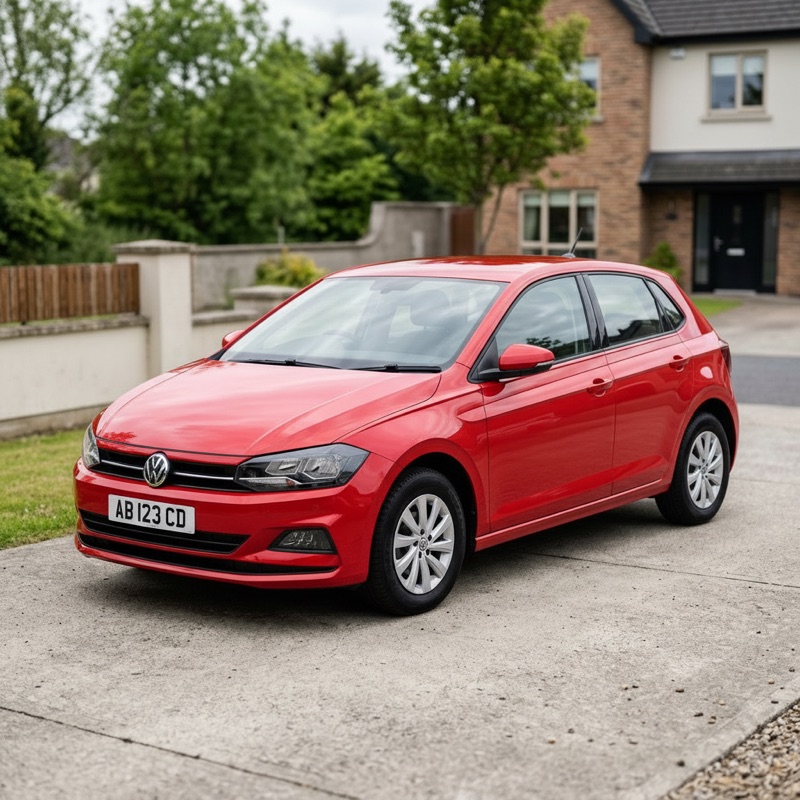 |
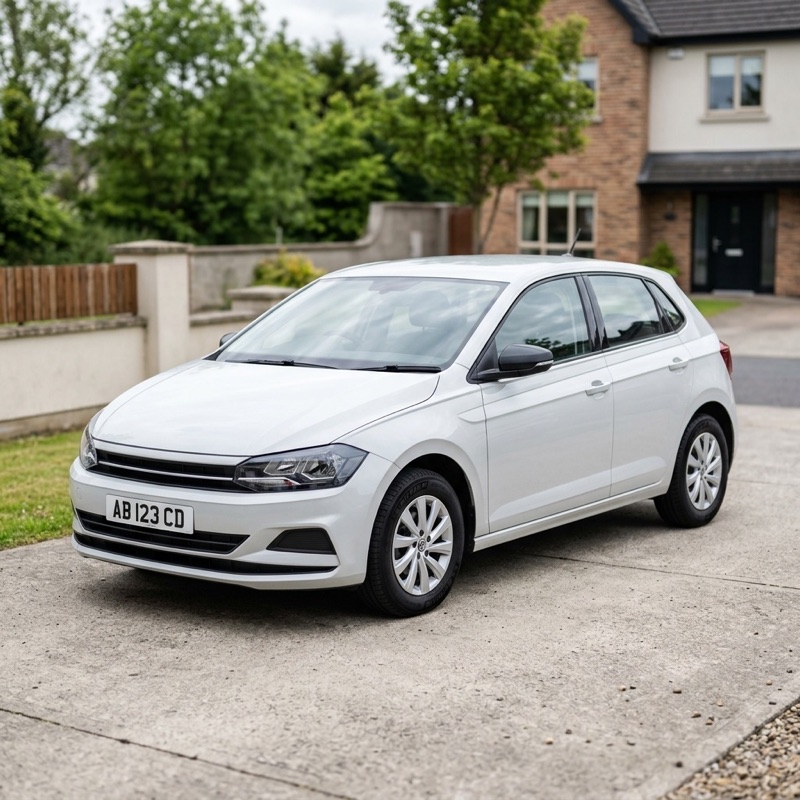
Real edit, one instruction: “Change the car body paint to glossy guards red. Keep the wheels, tyres, windows, chrome, number plate, background and shadow unchanged.” The alloy wheels, glass reflections, number plate and driveway shadow stayed intact; only the body panels were repainted.
| Before | After |
|---|---|
 |
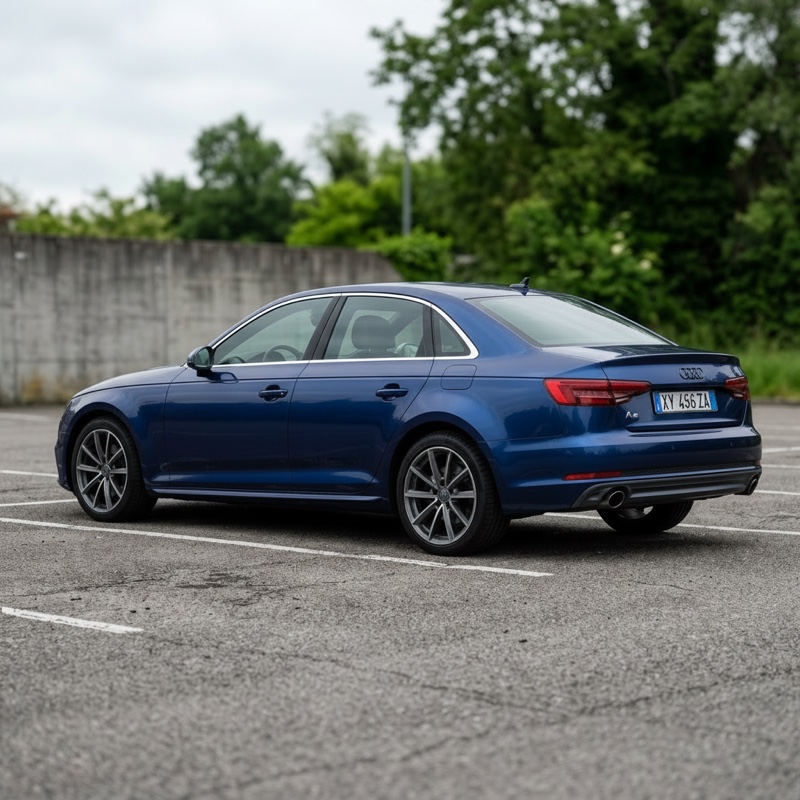 |
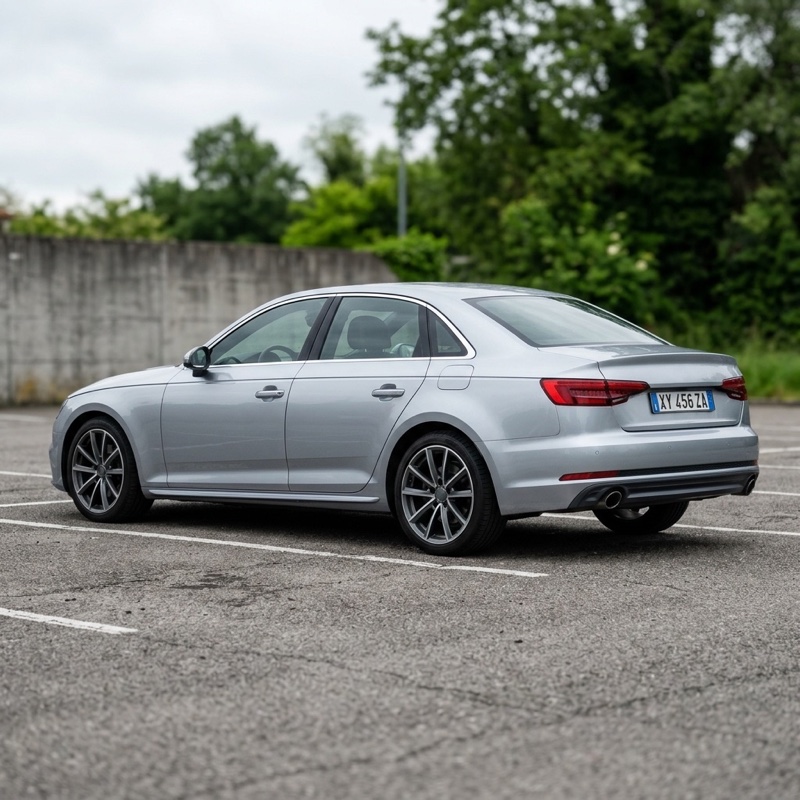
Real edit, one instruction: “Change the car body paint to satin midnight blue. Keep the wheels, tyres, windows, chrome, number plate, background and shadow unchanged.” The satin blue finish followed the body creases and sky reflections while leaving the wheels, chrome window trim, taillights and number plate untouched.
How to change the colour of a car in a photo
- Upload a photo where the car is clearly visible. A side-on or front three-quarter shot works best. The car should fill at least half the frame, and the paint should not be in deep shadow.
- Name the paint, not just the colour. "Glossy red" behaves differently from "matte black", and "satin blue" differently from "pearl white". One adjective is the difference between a factory finish and a flat colour fill.
- Say what must not change. Wheels, tyres, glass, chrome, badges, number plate, background and the shadow under the car. Naming them is what stops the model repainting the whole picture.
A sentence that works as it is:
Change the car body paint to glossy guards red. Keep the wheels, tyres, windows, chrome, number plate, background and shadow unchanged.
Ten car colours that read cleanly
Swap the colour name, keep the rest of the sentence identical and the results stay in a matching set.
| Colour | What to type | Reads best on |
|---|---|---|
| Glossy red | glossy guards red |
white, grey and silver cars |
| Matte black | matte black |
dark cars, performance models |
| Satin blue | satin midnight blue |
silver and white cars |
| Pearl white | pearl white |
dark cars where white shows the shape |
| Gunmetal | gunmetal grey |
anything with sharp body lines |
| Racing green | british racing green |
classics and coupés |
| Nardo grey | flat nardo grey |
modern performance cars |
| Taxi yellow | glossy taxi yellow |
small cars and vans |
| Midnight purple | deep metallic purple |
coupés and saloons |
| Burnt orange | metallic burnt orange |
SUVs and pickups |
What the edit changes, and what it leaves alone
- Body panels change. Doors, bonnet, roof, wings and bumpers are repainted as one surface, so the colour stays consistent across panel gaps.
- Reflections follow the paint. A sky reflected in the paint is repainted with the paint — that is what makes the result look like a photograph instead of a colour fill.
- Glass keeps its own reflection. The sky in the windscreen stays as it was, which is exactly what a real repaint looks like.
- Wheels, tyres, chrome and badges normally keep their finish. Add "keep the wheels, tyres and badges unchanged" when a car has bright polished wheels.
- Ground shadow stays where it was. The shadow is not repainted, but a strong new colour can leave a faint colour cast on the ground — ask for "keep the ground and shadow unchanged" if that happens.
- Black plastic trim can pick up a tint. Window surrounds, door handles and mirror caps are the one place we have seen it: on a black car going red, the B-pillar trim turned red with the body. Add "keep the black window trim, door handles and mirror caps black" to stop it.
Which photos work best
- Side or front three-quarter, daylight. The strongest results come from a car that fills the frame with even light on the paint.
- Metallic and pearlescent paint is fine. Silver, gunmetal and pearl finishes keep their flake and gradient instead of flattening to a solid colour.
- Hard reflections are fine. Cloud, sky and window reflections in the paint survive the repaint, which is the hard case for cheaper tools.
- Matte colours lose some panel definition. On white and black cars, matte black and flat grey can look slightly like a vinyl wrap. Use satin or gloss when you need the body lines to read.
- Avoid night shots, heavy motion blur and cars half in shadow. There is not enough paint visible for the model to work with.
Render the colour before you commit to a respray
A respray quote takes a week and costs four figures; a wrap takes a day. Rendering the colour on your own car first answers the only question that matters — whether the colour suits the car — in half a minute. It is also the fastest way to show a customer two options side by side: run the same photo twice with the same sentence and only the colour name changed.
If you need a different background behind the car as well, do that in the same edit: see replace the background. To take something out of the shot first — a bin, a sign, another car — use remove an object. Need to update a sign or price tag instead? Try edit text in an image.
Free edits and the paid pack
One edit a day is free, with no account and no card. The free image carries a small corner watermark. If you need more, a one-off pack of 100 edits is $9.90 — see what the pack includes. Failed edits are not charged: if the model refuses or the request errors, the credit stays.
Quick answers
Can I see my own car in a different colour?
Yes — that is the whole point. Use a photo of your own car, and the render shows that car in the new colour, with its own reflections, wheels and background.
Will the wheels change colour too?
Normally no. The model treats wheels, tyres, glass and chrome as separate surfaces. Bright polished wheels are the exception, so name them in the instruction.
Can I try several colours on the same photo?
Yes, one edit at a time. Keep the sentence identical and change only the colour name, and the results line up as a set.
Does it keep the number plate?
Usually yes, but a plate can be repainted along with the bumper when the new colour is very different from the old one. "Keep the number plate unchanged" removes the risk.
Can I change only the doors and not the whole car?
Not reliably. The instruction works on the body as one surface; partial repaints come back patchy around panel gaps.
Does it work on vans, SUVs and pickups?
Yes. Large flat panels are easier than a small sports car; a pickup with a roof rack or graphics is the harder case because the model has to leave the roof and decals alone.
Is the render realistic enough to show a customer?
For colour selection, yes. It is not a substitute for a wrap preview built on the manufacturer's paint codes, and it does not show the finish in motion or at night.
Back to the AI image editor.
1 free edit a day, no signup. 100 more edits are one-off $9.90 — no subscription, failed edits never charged.
Last updated: 28 November 2026