AI Clothes Changer
Describe the outfit you want. The face, the pose and the background stay where they are.
1 — Your photo
2 — The outfit you want
Replace the ___ with what you want changed.
Clothes swap, and why the wording matters more here
Changing an outfit is the one edit where a lazy instruction fails most visibly: the model does re-render the whole frame, and anything you did not protect can move. The people who get good results all do the same thing — they protect the rest of the photo in the same sentence.
Compare:
- Make the jacket black. — the model has been given a colour and no boundary.
- Change the jacket to a black leather jacket. Keep the face, hair, pose and background unchanged. — the second clause is what stops the face drifting.
That "keep…" clause is not decoration. It is the part of the instruction that constrains the regeneration.
An AI outfit changer works on the garment, not on you
This tool edits the clothing in an existing photograph. It is not virtual try-on: try-on takes a product photo of a specific garment and places it on a body, and the result has to match that garment exactly. Here you describe the outfit in words, and the model produces a plausible garment — often better than try-on for editorial or profile pictures, and never a guarantee of an exact item.
If you need the exact product, this is the wrong tool. If you need "a person like this, in an outfit like that", it works.
An outfit changer for profile photos and product shots
Two uses come up again and again:
- Profile and CV photos — turn a casual snapshot into something with a blazer, or shift the colour of what you are already wearing.
- Product and listing photos — show the same garment in a second colourway without reshooting.
Both work because the background and the pose are boring. Where it gets hard is busy prints, small logos and hands crossing the body.
A real example
This pair came out of this page, with the instruction:
Change the outfit to a black leather jacket. Keep the face, hair, pose and background unchanged.
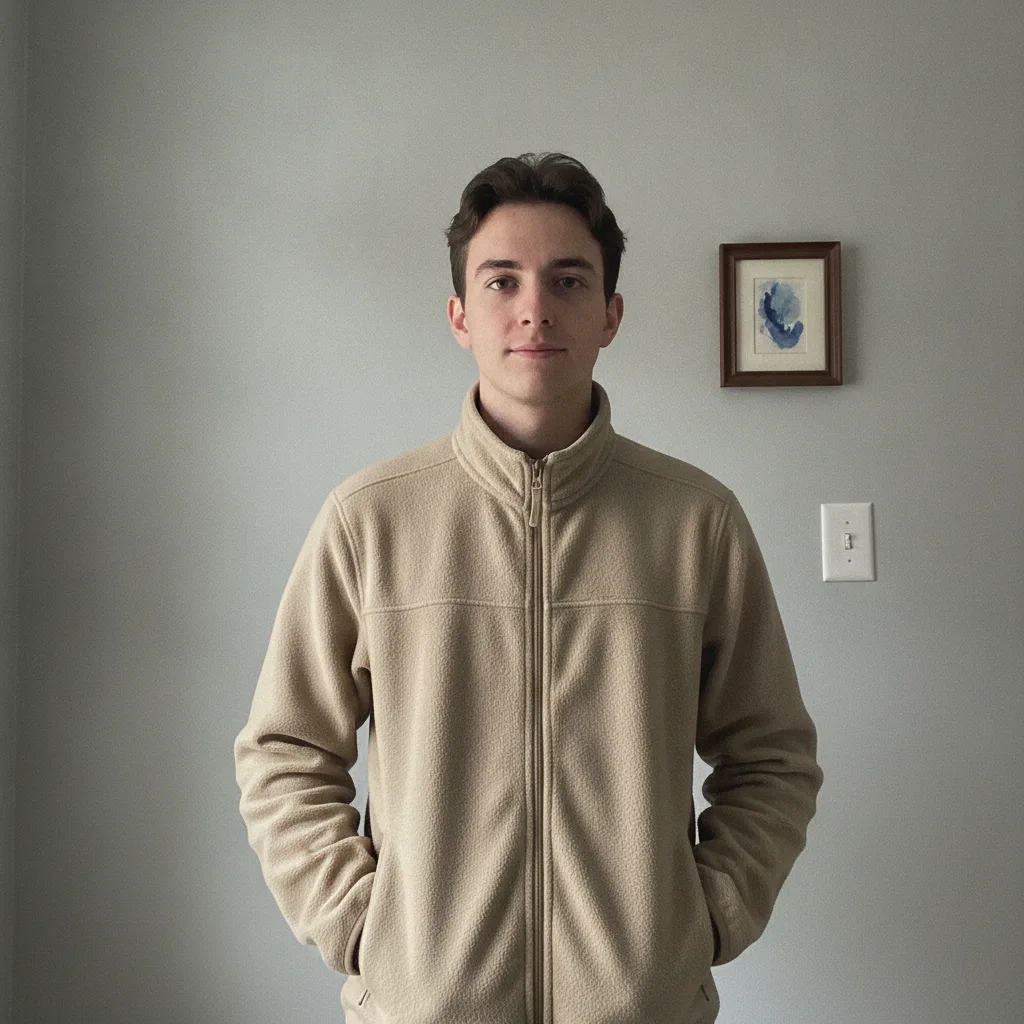 Before
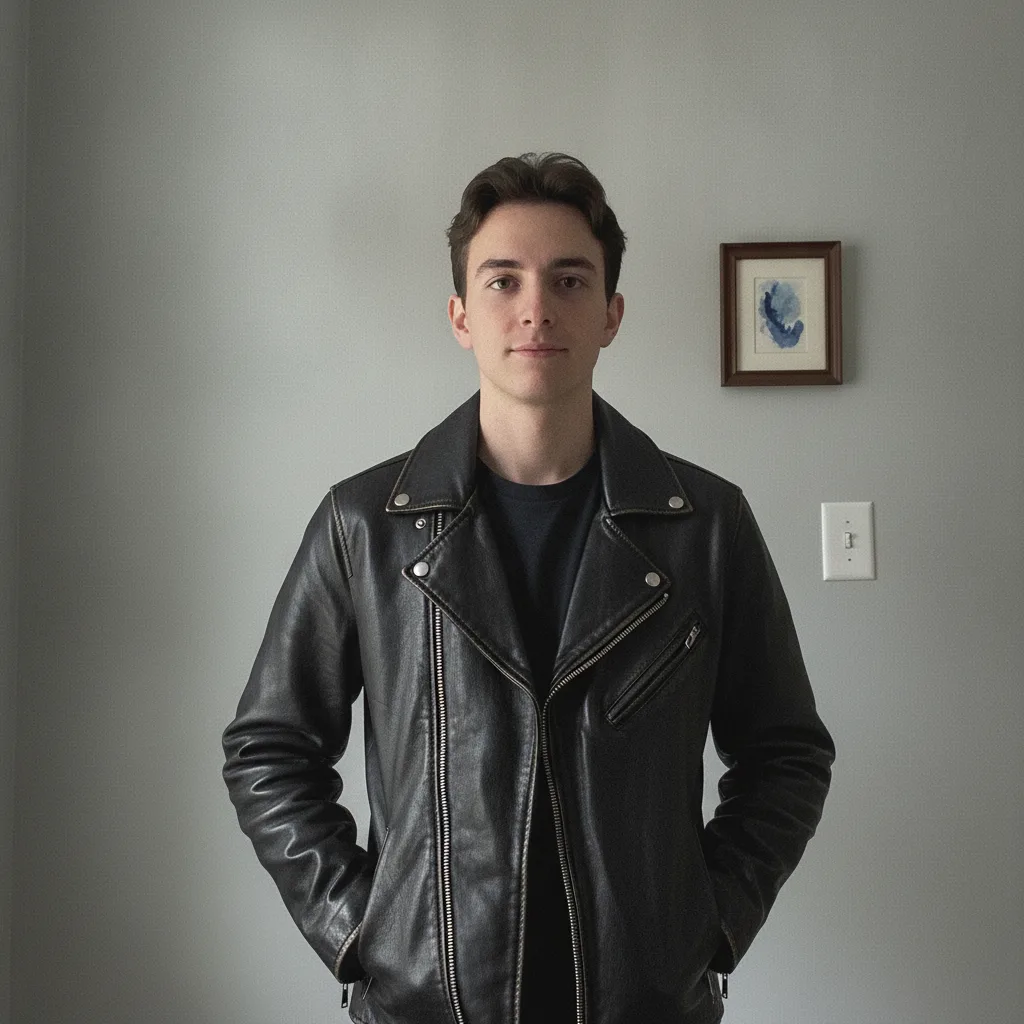 After
Jacket replaced, face unchanged
“Change the outfit to a black leather jacket. Keep the face, hair, pose and background unchanged.”
The face, the hair, the hands in the pockets and the framed picture on the wall are all where they were. That is not luck — the "keep unchanged" clause plus a front-on photo is what makes it repeatable.
Photograph for the edit, not for the album
- Front-on, face uncovered — no hats, no sunglasses, no hair across the face. The easier the face is to recognise, the more stable it stays.
- Even light — a hard shadow across the face is the most common cause of a face that changes.
- Half-body, not full-length — more pixels on the garment.
- Plain background — a busy background is the second most common cause of drift.
Where it fails
- Hands in front of the torso — fingers and garment edges are rebuilt badly.
- Prints, stripes and logos — patterns rarely survive; text on clothing nearly never does.
- Changing the cut — "make it a fitted suit" rebuilds the silhouette and often the body. Colour and material changes are far more reliable than shape changes.
- Group photos — one instruction applies to everyone, and the model usually picks one person and guesses.
Using it responsibly
Change clothing on your own photos, or on photos you have permission to edit. Do not use it to show a real, identifiable person wearing something they did not wear, or in a situation they were not in — that is prohibited by the terms of use and it is the fastest way to turn a harmless edit into a problem.
Free edits and credits
One edit a day is free and needs no account. Credit packs start at $9.90 for 100 edits, one-off. Failed edits are never charged.
Frequently asked questions
Can I change clothes in a photo without changing the face?
Yes, if you say so explicitly. Add keep the face, hair, pose and background unchanged to the instruction, and photograph the person front-on with the face uncovered.
Is this a virtual try-on?
No. Try-on puts a specific garment photograph onto a person and must preserve that garment exactly. This tool changes clothing described in words, so the result is a new outfit rather than a photograph of yours.
What makes the edit fail?
Hands in front of the body, arms crossing the torso, busy prints, and small text on the clothing. Faces that are partly covered or lit unevenly also degrade faster.
Can I use a photo of someone else?
Only with their permission, and never to show a real person in clothing or a situation they were not in. The terms prohibit placing a real, identifiable person into a misleading situation.
Does it work on product photos?
Yes for colour or material changes on a plain background. Changing the cut or the fit is much less reliable, because the silhouette has to be rebuilt.
What does it cost?
One free edit a day without an account. Extra edits come in one-off credit packs from $9.90 for 100; there is no subscription.